
68 Niu Niu Withdrawal Guide
To withdraw from 68 Niu Niu, you must first bind your own payment account, then enter the withdrawal amount based on your available balance and submit your request. The current withdrawal page supports bank transfers and e-wallet payments; the account holder name must match your identity verification information. You can only withdraw after your deposit has met the 1x turnover requirement. The platform allows up to 2 withdrawals per day, with the first 2 being free; each withdrawal beyond that incurs a 3% fee.
- 1. 68 Niu Niu Withdrawal Steps: Link Your Receiving Account and Submit Request
- 2. How to Fill in Your 68 Niu Niu Receiving Account?
- 3. Which Banks and E-Wallets Does 68 Niu Niu Support for Withdrawal?
- 4. 68 Niu Niu Withdrawal Balance and 1x Turnover Requirement
- 5. 68 Niu Niu Withdrawal Frequency and Fees
- 6. 68 Niu Niu USDT Withdrawal Guide
- 7. 68 Niu Niu Withdrawal FAQs
68 牛牛 Withdrawal Steps: Bind Payment Account and Submit Application
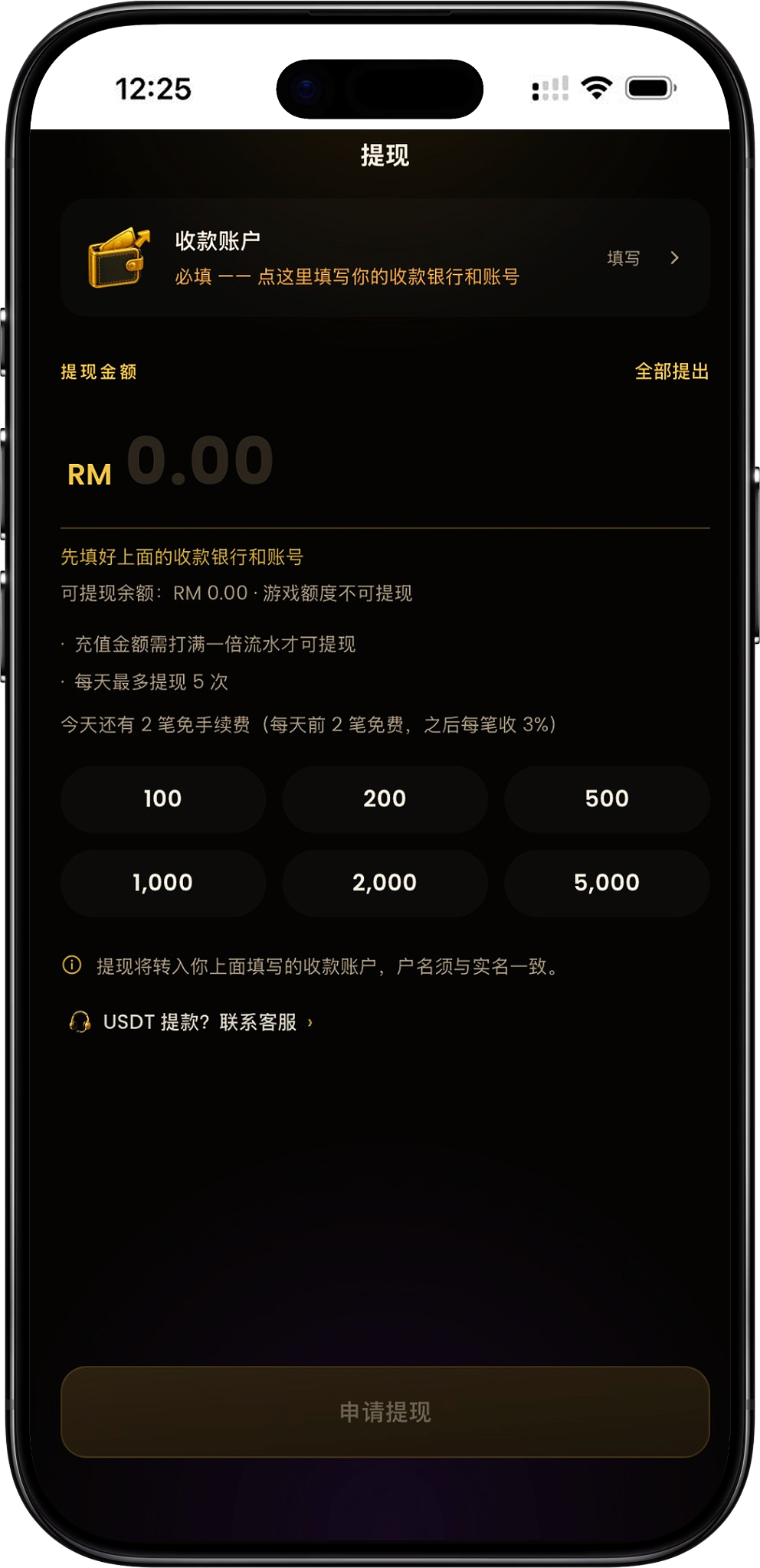
Before withdrawing from 68 Niu Niu, you must first complete your payment account setup. Once the account is saved, return to the withdrawal page to check your available balance, enter the amount you wish to withdraw, and submit your request. Please refer to the current balance, withdrawal count, and fee information displayed on the page.
Step 1: Go to the Withdrawal Page
After accessing the withdrawal feature from the platform, the page will display your payment account, withdrawal amount, available balance, daily withdrawal count, and fee information. If you haven't set up a payment account yet, you must complete your account details first.
Step 2: Click "Payment Account" to Fill in Details
Click "Payment Account" at the top of the page to open the account settings window. The system will display your identity-verified account holder name and require you to select a bank or wallet and enter the corresponding account number.
Step 3: Select a Bank or E-Wallet
From the "Bank / Wallet" options, select the account you actually use for receiving payments, including Touch 'n Go eWallet and banks supported by the page. Before selecting, confirm the account belongs to you and matches your verified information on the platform.
Step 4: Enter Your Account Number
After selecting your bank or wallet, enter the correct account number in the "Account" field and carefully verify all details. The page clearly states that the account number can only be filled in once by the user; any future changes must be made by contacting customer service.
Step 5: Save Your Payment Account
After confirming the bank or wallet, account holder name, and account number are correct, save your details. Since the account cannot be modified after saving, carefully verify the bank name and account number digits before submitting.
Step 6: Enter Withdrawal Amount
Return to the withdrawal page and enter the amount you wish to withdraw in the "Withdrawal Amount" field. You can also select from the quick amount options provided or use "Withdraw All". The amount you can actually request depends on your current available balance.
Step 7: Confirm Withdrawal Conditions
Before submitting, check that your deposit has met the 1x turnover requirement, and verify your remaining daily withdrawal count and fee status. Game credits cannot be directly withdrawn as available balance.
Step 8: Submit Withdrawal Request
After completing your payment account and amount setup and meeting the page's withdrawal conditions, click "Apply for Withdrawal" to submit. The withdrawal amount will be transferred to the payment account you previously entered.
How do I fill in the 68 牛牛 payment account?
The payment account is required information for withdrawal, including your identity-verified account holder name, bank or wallet, and account number. To avoid mismatched withdrawal information, use your own identity-verified account and thoroughly verify all details before saving for the first time.
Use Your Identity-Verified Account Holder Name
The account holder name on the payment account page comes from your identity verification information and cannot be modified by you. The withdrawal page also notes that the account holder name must match your verified identity, and you can only withdraw to your own account.
Select Your Bank or Wallet
You must select your actual payment method from the "Bank / Wallet" list provided by the platform, then enter the corresponding account number for that method. If using an e-wallet, select the wallet option actually available in the list.
Your Account Number Can Only Be Filled in Once
Important notice: The payment account can only be filled in once by the user. To make changes later, you must contact customer service. Please check the account details carefully on your first entry to avoid withdrawal issues due to incorrect information.
Which banks and e-wallets does 68 牛牛 withdrawal support?
The current payment account list includes Touch 'n Go eWallet, multiple Malaysian banks, and other e-wallets. The available options may vary based on the list shown on the withdrawal page at that time.
Touch 'n Go eWallet
The payment method list offers Touch 'n Go eWallet. You can select this e-wallet and enter your corresponding account details as your withdrawal payment account.
Malaysian Bank Account
Banks currently displayed include Maybank, CIMB Bank, Public Bank, RHB Bank, Hong Leong Bank, Bank Islam, AmBank, Affin Bank, Alliance Bank, Bank Rakyat, BSN, OCBC Bank, HSBC Bank, Standard Chartered, UOB Malaysia, Agrobank, Bank Muamalat, MBSB Bank, Al-Rajhi Bank, GXBank, Boost Bank and AEON Bank.
Other E-Wallets
In addition to Touch 'n Go eWallet, the current payment list also shows ShopeePay and GrabPay. When selecting an e-wallet, ensure the account information you enter belongs to you and meets the platform's real-name verification requirements.
68 牛牛 Withdrawal Balance and 1x Turnover Requirement
The withdrawal page distinguishes between withdrawable balance and gaming balance. Only balances that meet withdrawal conditions can be withdrawn. Deposit amounts must reach a 1x turnover requirement to qualify for withdrawal.
Deposit Amount Must Meet 1x Turnover
The current withdrawal page states: 'Deposits must complete 1x turnover to be eligible for withdrawal.' Completing a deposit does not immediately make funds eligible for withdrawal—you must first meet the turnover requirement shown on the page.
Based on Withdrawable Balance
The page directly displays 'Withdrawable Balance.' When requesting a withdrawal, use this amount as your reference. If the current withdrawable balance is insufficient, the corresponding amount cannot be submitted as a normal withdrawal.
Gaming Balance Cannot Be Withdrawn
The withdrawal page clearly distinguishes between withdrawable balance and gaming balance, noting that gaming balance cannot be withdrawn. Before entering an amount, check your actual withdrawable balance rather than relying solely on other account balances.
68 牛牛 Withdrawal Frequency and Fees
68 牛牛 sets clear rules for daily withdrawal frequency and fees. The current page shows a maximum of 2 withdrawals per day, with the first 2 withdrawals each day being fee-free. After exceeding the free limit, a 3% fee applies per withdrawal. Check the remaining free withdrawals shown on the page when making a request.
Maximum 2 Withdrawals Per Day
The current withdrawal page states: 'Maximum 2 withdrawals per day.' You can check how many withdrawals you've already made that day before submitting and schedule your withdrawal request accordingly.
First 2 Withdrawals Daily Are Fee-Free
The page displays the remaining fee-free withdrawal count for the day, noting that the first 2 are free. If you haven't withdrawn yet today, the page may show 2 remaining free withdrawal slots.
3% Fee Per Withdrawal After Free Limit
The withdrawal rules also note that after using your free withdrawal limit, subsequent withdrawals incur a 3% fee. Given that the page also sets a daily limit of maximum 2 withdrawals, whether additional fee-based withdrawals are actually possible depends on your account's current page state and the platform's latest rules.
68 Niu Niu USDT Withdrawal Guide
In addition to bank and e-wallet withdrawals, the withdrawal page offers a 'USDT Withdrawal? Contact Customer Service' option. The page does not display specific details for USDT withdrawal address entry, network selection, or fees. If you need to use USDT, contact customer service through the platform's support channel to learn the current requirements.
USDT withdrawal requires contacting customer service
You can access customer service from the USDT withdrawal prompt on the withdrawal page to inquire about current availability, required information, and the actual withdrawal process. Do not attempt to enter a cryptocurrency address following standard bank withdrawal steps.
68 Niu Niu Withdrawal FAQs
What do I need to do before withdrawing from 68 牛牛?
Before your first withdrawal, you need to set up a payment account by selecting a bank or e-wallet you use, and entering the correct account details. You can only proceed with withdrawals after completing account setup.
How much turnover is required for 68 牛牛 withdrawals?
The current page requires a 1x turnover on your deposit amount before you can withdraw. Whether you meet the condition should be based on your account's actual available withdrawal balance and platform records.
How many times per day can I withdraw from 68 牛牛?
According to the current withdrawal page, you can withdraw up to 2 times per day.
What is the 68 牛牛 withdrawal fee?
The page states that the first 2 withdrawals per day are free, with a 3% fee charged for each subsequent withdrawal. When submitting, please confirm based on the page's display of remaining free withdrawals and actual fees for the day.
Can I withdraw game credits?
No. The current page clearly states "game credits cannot be withdrawn". When withdrawing, you should use the withdrawal balance shown by the system.
Does the withdrawal account holder name have to match my verified identity?
No, it must match. The page requires that the payment account holder name matches your verified identity. You should use the payment account corresponding to your verified identity.
Can I modify the payment account after filling it in?
The page indicates that the payment account can only be filled in once by the user, and any changes afterward require contacting customer service. Therefore, you should confirm the bank or e-wallet and account number are correct when binding for the first time.
Can I withdraw from 68 牛牛 to TNG?
Yes. The current bank and e-wallet selection list includes Touch 'n Go eWallet, which is available as a payment account option.
Which e-wallets does 68 牛牛 support for withdrawals?
The current page displays Touch 'n Go eWallet, ShopeePay, and GrabPay. The specific available channels should be based on the options actually provided on the withdrawal page.
Can I use USDT for withdrawals from 68 牛牛?
The withdrawal page has a "USDT Withdrawal? Contact Customer Service" option, but does not directly list specific USDT withdrawal steps. If you need to use it, please contact platform customer service to understand the current requirements.
Apply for 68 Niu Niu Withdrawal
Go to the withdrawal page, bind a payment bank account or e-wallet that matches your verified identity, then check your available withdrawal balance, turnover requirements and daily withdrawal limit, and submit your withdrawal request after confirming.