
68 Niu Niu Top-Up Guide
You can top up your 68 Niu Niu account from the top-up entry in the game lobby. The page currently offers multiple funding methods including QR code scanning, bank transfer, FPX online banking, and TNG auto-deposit QR. Each method has its own amount range and payment process. For bank transfers, complete payment to the designated account assigned by the system, fill in the transfer reference correctly, and upload the receipt. For FPX and auto-deposit QR, simply follow the page prompts or scanning instructions. The top-up page also notes that funds are withdrawable once you've met the 1x turnover requirement.
- 1. 68 Niu Niu Top-Up Steps: Select Deposit Method and Enter Amount
- 2. QR Code Top-Up: RM100 to RM1,000
- 3. Bank Transfer Top-Up: RM100 to RM100,000
- 4. FPX Online Banking Top-Up: RM90 to RM30,000
- 5. TNG Auto-Deposit QR: RM90 to RM10,000
- 6. How to Fill in Remarks and Upload Proof When Making Bank Transfers?
- 7. What Does 1x Turnover Mean for 68 Niu Niu Top-ups?
- 8. Frequently Asked Questions About 68 Niu Niu Top-ups
68 Niu Niu Top-Up Steps: Select Deposit Method and Enter Amount
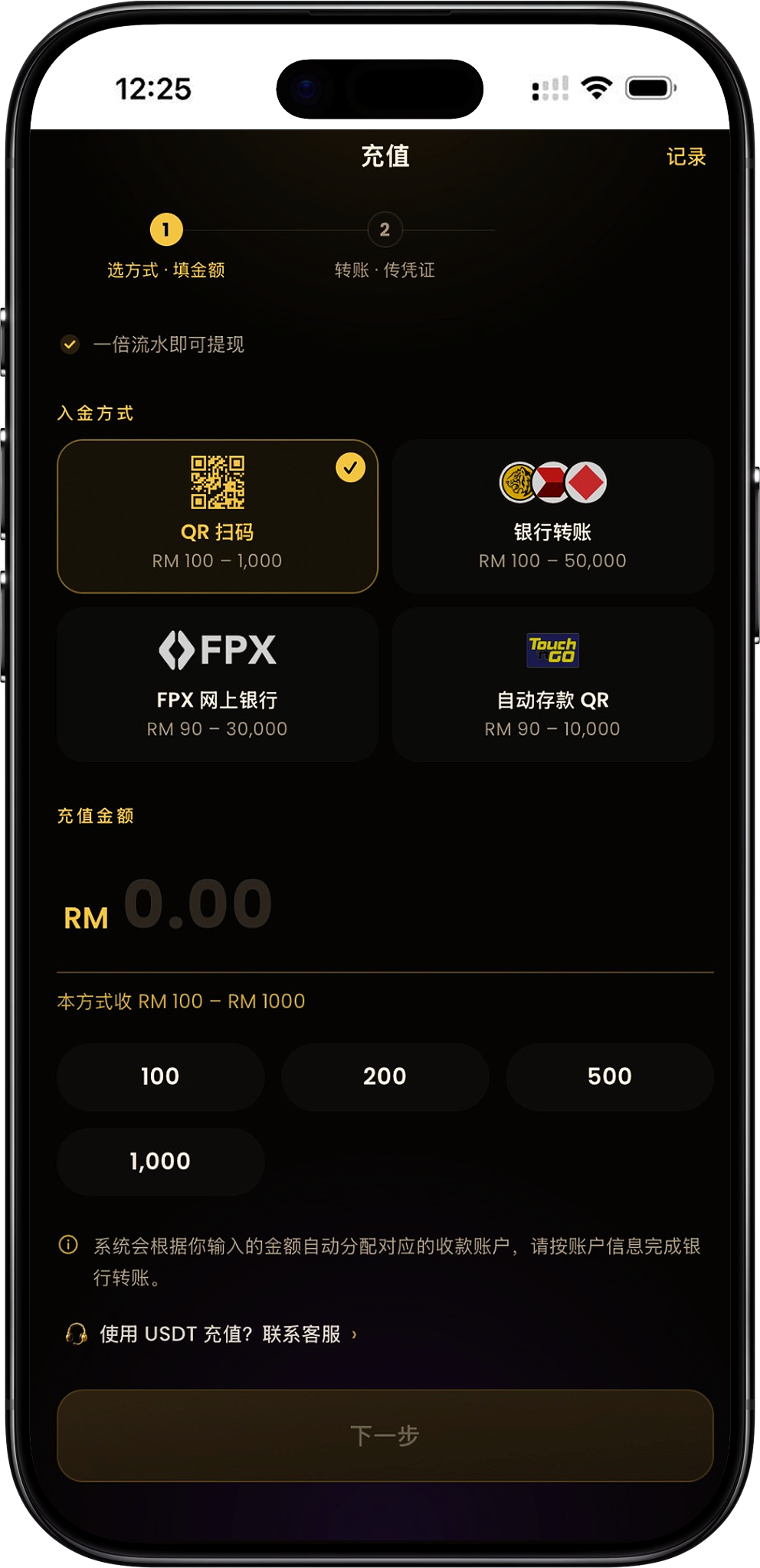
Topping up 68 Niu Niu involves two main stages: "selecting a method and entering the amount" and "completing payment or submitting proof". After entering the top-up page, select your preferred funding method and enter an amount within the corresponding range, then complete the subsequent payment steps according to your chosen method.
Step 1: Enter the Top-Up Page
From the 68 Niu Niu game lobby, go to "Top-Up". The page displays all available funding methods and their corresponding amount ranges. You can also view your top-up history by clicking "Records" in the top-right corner.
Step 2: Select a Top-Up Method
The main methods currently available are QR code scanning, bank transfer, FPX online banking, and auto-deposit QR. Different methods have different minimum and maximum top-up amounts, so confirm your amount falls within the supported range first.
Step 3: Enter the Top-Up Amount
After selecting a funding method, enter or select your amount in the "Top-Up Amount" field. The page will display the corresponding collection range for your chosen method and provide quick-select options for common amounts.
Step 4: Click "Next" to Proceed with Payment
Once you've confirmed your funding method and amount, click "Next". The subsequent steps will vary depending on your chosen method—you may need to scan a code, transfer via bank, use online banking, or follow other relevant steps.
QR Code Top-Up: RM100 to RM1,000
QR code scanning is one of the funding methods available on the top-up page, with an amount range of RM100 to RM1,000. After selecting this method, follow the page's QR code and payment instructions.
Step 1: Select QR Code Scanning
Select "QR Code Scanning" under "Funding Method". The page will display the collection range for this method: RM100–1,000.
Step 2: Enter an Amount Between RM100 and RM1,000
Enter the amount you wish to top up and ensure it falls within the RM100–RM1,000 range allowed for this method.
Step 3: Proceed to Next Step for Payment Details
Click "Next". Based on the payment QR code and information provided on the page, complete the transfer and follow any further on-screen instructions.
Bank Transfer Top-Up: RM100 to RM100,000
Bank transfer supports a higher top-up range, currently shown as RM100 to RM100,000. The system will assign a corresponding collection account based on the amount you enter. You'll then need to complete the payment using the receiving bank details, account information, and the specified transfer reference.
Step 1: Select Bank Transfer
On the top-up page, select "Bank Transfer" and confirm the top-up range displayed is RM100–100,000.
Step 2: Enter the Top-Up Amount
Enter your desired RM amount to top up, then click "Next". The system will automatically assign a corresponding collection account based on your entry.
Step 3: Review the System-Assigned Collection Account
The next page will display the amount due, receiving bank, account holder name, account number, and "Transfer Reference". Verify each detail before transferring and refer to the information currently displayed on the page.
Step 4: Complete the transfer via bank or DuitNow
Complete the bank transfer using the payment details displayed on the page. The payment page shows both bank transfer and DuitNow transfer examples, and requires the payment amount to match the system-generated amount due.
Step 5: Enter the designated transfer reference
When making a bank transfer, you must enter the corresponding order number exactly as shown in the "Transfer Reference" field on the page. The page clearly states that an incorrect or missing reference may result in the funds not being properly credited to your account.
Step 6: Upload the transfer receipt after payment
After the transfer is complete, return to the top-up page, select and upload your transfer receipt. The page allows you to choose an image from your gallery, and it will be automatically compressed upon submission. After the receipt is uploaded, proceed according to the page instructions to complete the submission.
FPX Online Banking Top-Up: RM90 to RM30,000
The current amount range supported by FPX Online Banking is RM90 to RM30,000. After selecting FPX, you can choose your bank from the list displayed on the page, then proceed with the online banking payment process.
Step 1: Select FPX Online Banking
Select "FPX Online Banking" from the deposit methods. The page will display that this method supports RM90–30,000.
Step 2: Enter an amount within the supported range
Enter your top-up amount and confirm it falls between RM90 and RM30,000. The page will also provide common amounts for quick selection.
Step 3: Choose your bank
The FPX page will provide available banks to choose from, such as Malayan Banking, CIMB Bank, Public Bank, RHB Bank, Hong Leong Bank, Alliance Bank Malaysia, Bank Simpanan Nasional and Affin Bank, depending on the bank list currently displayed on the page.
Step 4: Go to online banking to pay
After selecting your bank, click "Next · Proceed to Payment" and follow the FPX process to redirect to your online banking to complete the payment. The page notes that the payment will be automatically credited after completion, and you do not need to upload a transfer receipt separately.
TNG Auto Deposit QR: RM90 to RM10,000
Auto Deposit QR is another QR code payment method available on the top-up page, which uses the Touch 'n Go logo and supports RM90 to RM10,000. Payment is automatically credited according to the page instructions, with no need to upload a receipt separately.
Step 1: Select Auto Deposit QR
Select "Auto Deposit QR" from the "Deposit Methods", and the page will display the current supported amount range as RM90–10,000.
Step 2: Enter the Top-Up Amount
Enter the top-up amount you need, with a minimum of RM90 and a maximum of RM10,000. You can also quickly select from the common amount buttons provided on the page.
Step 3: Enter the payment page
After confirming the amount, click "Next · Proceed to Payment", then complete the QR code payment using the corresponding payment method based on the QR code provided on the page.
Step 4: Wait for automatic credit after payment
The page indicates that this method is for QR code payment, and the funds will be automatically credited after payment is complete. Unlike regular bank transfers, you do not need to upload a transfer receipt.
How to Fill in Notes and Upload Proof for Bank Transfers?
Bank transfers require special attention to the transfer reference, account holder name and payment receipt. The system generates unique payment details for each top-up transaction, and if the reference or payment details do not meet the requirements, it may affect backend verification and crediting.
The transfer reference must include the order number displayed on the page
The transfer page generates a unique reference number, such as an order number starting with PAYMENT. When making a bank transfer, you must fill in this reference exactly as provided in the Reference or Notes field of your bank transfer — do not omit or alter it.
Transfer from your own verified account in your legal name
The page requires you to complete the top-up using a bank account registered under your legal name. If the bank account holder name does not match your verified identity, the page will indicate that the funds may not be accepted. Please verify the name before making the payment.
Reference should only contain the order number
The page advises that the transfer reference should only contain the system-provided order number. If the reference contains sensitive terms such as investment, cryptocurrency, commission, tax, mall, Topup, Bet, Jackpot, Lottery, Win, platform names, or exchange names, it may prevent normal fund settlement.
You must return and upload proof of payment after completing the transfer
After completing a regular bank transfer, you must return to the top-up page and upload proof of payment; otherwise, the backend may not be able to see the transfer details. The upload area allows you to select images from your gallery as transfer proof.
What Does 1x Turnover Mean for 68 Niu Niu Top-Ups?
The top-up page states "1x turnover required for withdrawal," meaning your top-up funds must meet the 1x turnover requirement specified on the page before you become eligible for subsequent withdrawals. Actual turnover calculations and withdrawal status should be based on your account and the platform's current data.
The top-up page displays the turnover requirement
After entering the top-up feature, you can see the "1x turnover required for withdrawal" notice at the top of the page, allowing you to understand the basic requirements between fund usage and subsequent withdrawals before topping up.
Turnover status is based on platform account records
Turnover is data related to actual account activity. Whether the corresponding conditions have been met should be based on the platform's current account records and the information displayed on the withdrawal page.
68 Niu Niu Top-Up FAQs
What top-up methods does 68 Niu Niu currently offer?
The current top-up page displays QR code scan, bank transfer, FPX online banking, and TNG auto deposit QR. The page also provides an entry point: "Top up with USDT? Contact support."
What is the minimum top-up amount for 68 Niu Niu?
The minimum amount varies by method. QR code scan and bank transfer minimum is RM100; FPX online banking and auto deposit QR currently minimum is RM90.
How much can I top up with QR code scan?
The current QR code top-up range displayed is RM100 to RM1,000.
What is the maximum bank transfer top-up amount?
The current bank transfer amount range is RM100 to RM100,000.
What is the FPX online banking top-up range?
FPX online banking currently supports RM90 to RM30,000.
How much can I top up with TNG auto deposit QR?
The current auto deposit QR amount range is RM90 to RM10,000.
Why is a Reference number required for bank transfers?
The system generates a unique transfer note order number for each top-up, used for backend payment verification. Please enter it exactly as shown on the page — any omission or error may cause your payment to be incorrectly matched.
Do I need to upload proof of bank transfer?
Yes. After completing a bank transfer, return to the top-up page to upload the transfer proof, then continue with the on-page steps.
Do I need to upload proof after FPX payment?
According to the current FPX page instructions, after selecting your bank and completing online banking payment, funds are deposited automatically with no need to upload additional proof.
Do I need to upload proof for auto-deposit QR?
According to the current page instructions, after scanning the auto-deposit QR code and completing payment, funds are deposited automatically with no need to upload additional proof.
Can I top up with USDT?
The top-up page provides a "Top up with USDT? Contact Support" link. To use USDT, please inquire through the customer service channel on the page for current payment methods and requirements.
How much turnover is required before I can withdraw?
The current top-up page states "1x turnover required to withdraw". Whether your account meets the conditions should be verified by the platform's records and the withdrawal page display.
Start Top-Up for 68 Niu Niu
Go to the top-up page, select QR scan, bank transfer, FPX online banking, or TNG auto-deposit QR, then complete your deposit according to the amount range and payment steps for your chosen method.