
68 NiuNiu Download Guide
68 NiuNiu requires no separate game installation package. Currently, the 68 NiuNiu App runs through Telegram. Users can access the official Telegram from the download link on the website, launch the Bot, and select "Enter Game Hall" in the chat to open the 68 NiuNiu application. Android, iOS, and Desktop devices can all follow their respective methods. Complete steps are organized below.
- 1. 68 NiuNiu Download Method: Run 68 NiuNiu App via Telegram
- 2. Android Device: Steps to Download and Open 68 NiuNiu
- 3. iOS Apple Device: Steps to Download and Open 68 NiuNiu
- 4. Desktop Windows and macOS: Steps to Download and Open 68 NiuNiu
- 5. What can I do after entering the 68 NiuNiu App game lobby?
- 6. 68 NiuNiu Download FAQs
68 NiuNiu Download Method: Run 68 NiuNiu App via Telegram
Currently, the 68 NiuNiu App runs on Telegram, so the download page mainly guides users from the website to the official 68 NiuNiu Telegram rather than providing a standalone APK or other game installation files. After entering the official page and launching the Bot, you can open the game hall through Telegram.
Access the official download link from the 68 NiuNiu website
Click the download-related button on the current webpage, and the page will navigate to the 68 NiuNiu official Telegram. Once there, you'll see the 68 NiuNiu name, Bot account, and "START BOT" button to continue opening Telegram.
Click START BOT to open Telegram
Click "START BOT" on the official Telegram page, and your device's Telegram App will open, taking you to the 68 NiuNiu official Bot chat. If Telegram isn't installed on your device, you'll need to set up a working Telegram application first.
Click "Enter Game Hall" to run the App
After entering the official Bot, click "Enter Game Hall" in the chat. The system will then open the 68 NiuNiu App game hall, where users can access the platform's features.
Steps to Download and Open 68 NiuNiu on Android Devices
Android users don't need to find a separate 68 NiuNiu APK. Since the current App runs through Telegram, Android devices only need a working Telegram environment and can access the official link from the 68 NiuNiu website.
Step 1: Open the 68 NiuNiu website on Android
Use your Android phone's browser to visit the 68 NiuNiu website and find the download button on this page. Clicking it will take you to the official 68 NiuNiu Telegram page.
Step 2: Click START BOT
After confirming the Telegram page shows the official 68 NiuNiu Bot, click "START BOT" and follow your device's prompts to open the Telegram App and enter the corresponding chat.
Step 3: Click "Enter Game Hall" on Telegram
Once Telegram opens, find and click the "Enter Game Hall" button on the 68 NiuNiu Bot chat page. The system will continue opening the 68 NiuNiu App from within Telegram.
Step 4: Enter the Game Hall on Android
After the App opens, it will display the 68 NiuNiu game hall. Users can view their account balance and access platform features like top-ups, withdrawals, transfers, game guides, and room entries.
iOS Apple Device: Steps to Download and Open 68 NiuNiu
iPhone and other Telegram-supporting iOS devices run the 68 NiuNiu App through Telegram in the same way. The process is not to separately download a standalone 68 NiuNiu iOS client, but to open the game hall after accessing the official Telegram from the website.
Step 1: Open the website on Apple iOS devices
Use an iOS device like iPhone to open the 68 NiuNiu website and click the download link on the download page. The page will then redirect to the official Telegram Bot.
Step 2: Open Telegram via START BOT
On the 68 NiuNiu Telegram page, click "START BOT", then use the Telegram App on your device to open the official Bot chat. You can first confirm the page shows the correct 68 NiuNiu entry.
Step 3: Select "Enter Game Hall"
After entering the Telegram chat, click the "Enter Game Hall" button on the page. The system will launch the 68 NiuNiu App within the Telegram environment.
Step 4: Open 68 NiuNiu App on iOS
Once the game lobby loads, you've successfully accessed the 68 NiuNiu App on your iOS device. You can then proceed with the features provided in the lobby.
Desktop Windows and macOS: Steps to Download and Open 68 NiuNiu
Desktop users can also access 68 NiuNiu via Telegram. The core process is the same for Windows and macOS: visit the 68 NiuNiu official website to enter the official Telegram, start the Bot, then access the game lobby from the chat page.
Step 1: Open the 68 NiuNiu website on Windows or macOS
Use your desktop browser to visit the 68 NiuNiu website and click the download button on the Download page. Your browser will navigate to the 68 NiuNiu official Telegram Bot page.
Step 2: Click START BOT on the official page
The Telegram page will display the 68 NiuNiu Bot and the "START BOT" button. After clicking it, follow your browser and system prompts to open the corresponding Bot with Telegram.
Step 3: Open Desktop Telegram
If your browser asks whether to open Telegram, you can allow the system to use the Telegram app on your computer to proceed. Both Windows and macOS users can access the Bot through their respective Desktop Telegram environment.
Step 4: Click "Enter Game Lobby"
After entering the 68 NiuNiu Bot chat page, click "Enter Game Lobby". The 68 NiuNiu App will then launch and you'll enter the game lobby.
What can I do after entering the 68 NiuNiu App game lobby?
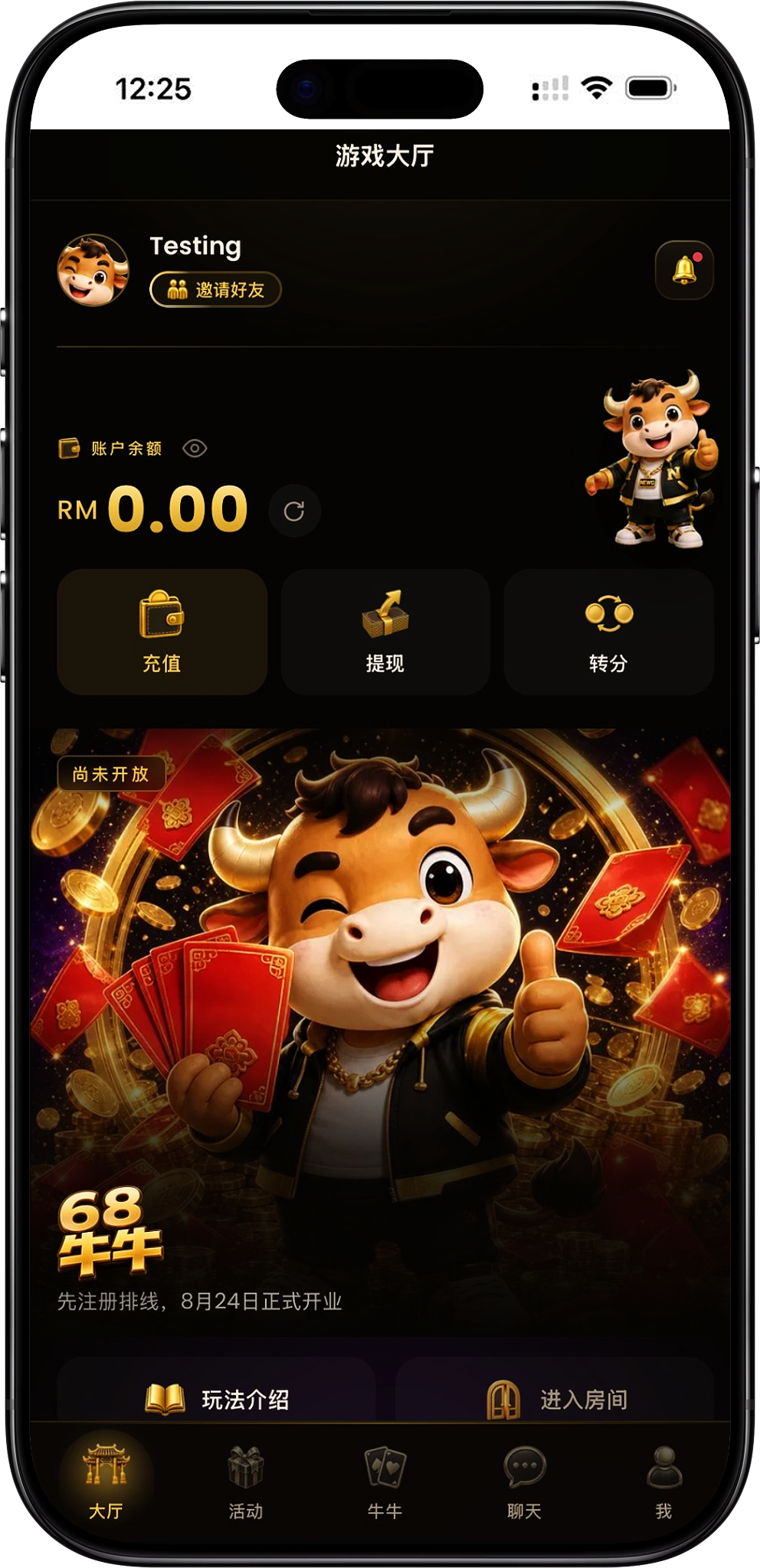
Once the App opens successfully, you'll enter the 68 NiuNiu game lobby. The lobby displays your account name and main platform features, serving as your starting point for accessing other features.
Check account balance
The game lobby displays your current account name and balance, with a balance refresh option so you can easily view your current account funds.
Use top-up, withdrawal and transfer features
The lobby provides three separate entry points for top-ups, withdrawals and transfers. When you need to perform these actions, you can select the corresponding feature directly from the lobby.
View game instructions or enter a room
New users can first check "Game Instructions" to learn about the games. When ready to play, select "Enter Room" to proceed to the appropriate area.
68 NiuNiu Download FAQs
Where can I download the 68 NiuNiu App?
Currently, the 68 NiuNiu App runs through Telegram. You can access the official Telegram from the download page on the 68 NiuNiu website, start the Bot, then click "Enter Game Lobby" to open the App.
Does 68 NiuNiu have a standalone APK?
According to the current platform information, 68 NiuNiu does not require a standalone APK to run. Android users can open the 68 NiuNiu App through Telegram, so there's no need to look for an APK file separately.
Can Android use 68 NiuNiu?
Yes. Android users can access the official Telegram from the website, open the Telegram App through "START BOT", then click "Enter Game Lobby" to run 68 NiuNiu.
Can Apple iPhone open the 68 NiuNiu App?
Yes. iOS users can access the official Bot from the official website on Apple devices that support Telegram, then open the 68 Niuniu App through "Enter Game Hall".
Can Windows and macOS use 68 Niu Niu?
Yes. Desktop users can visit the official website using Windows or macOS browsers, then open the official Bot through Telegram and enter the game lobby from the chat page.
Why does the download button on the official website redirect to Telegram?
Because 68 NiuNiu App currently runs on Telegram, the official website's Download page guides users to the official Telegram instead of providing a standalone game installation file directly.
Which button do you need to press after entering Telegram?
First click "START BOT" on the official Telegram page to open Telegram. After entering the 68 NiuNiu Bot chat, click "Enter Game Hall" to run the App.
Open 68 NiuNiu App
From the 68 NiuNiu official website, enter the official Telegram, launch the Bot and select "Enter Game Hall" to run the 68 NiuNiu App on Android, iOS, Windows or macOS devices.